



Advertisement
Advertisement
Although it might be enticing to dive straight into Road to Glory or Dynasty upon downloading College Football 26, the smartest move is to first navigate to the settings menu. This step lets you tailor every gameplay option and acquaint yourself with some of the new features EA has introduced this year. Within the settings menu, one of the crucial sections is "Passing Mechanics," where it's vital to choose the correct options.
These settings dictate nearly every aspect of passing in CFB 26. However, some options might be a bit perplexing, so we're here to break down the optimal Passing Mechanics settings for you.
Optimal Passing Mechanics in College Football 26
To access the Passing Mechanics settings, simply open the main menu of CFB 26 and check the tab bar at the top of the screen. There, you'll find the "Settings" tab towards the end of the list. Navigate to Settings and then opt for "Gameplay Settings." In the Settings menu, scroll through the "Game Options" tab until you reach Passing Mechanics.
You'll notice several passing settings to adjust, with the most critical being "Passing Type." This setting can radically alter how passing functions in CFB 26, so it's important to know which one you are selecting.
If you want a detailed guide on the best Passing Mechanics settings to choose, take a look below:
- Passing Type: Placement & Accuracy
- Passing Slowdown: Off
- Pass Lead Increase: Small
- Reticle Speed: 12-14
- Reticle Visibility: User Only
- Meter Visibility: User Only
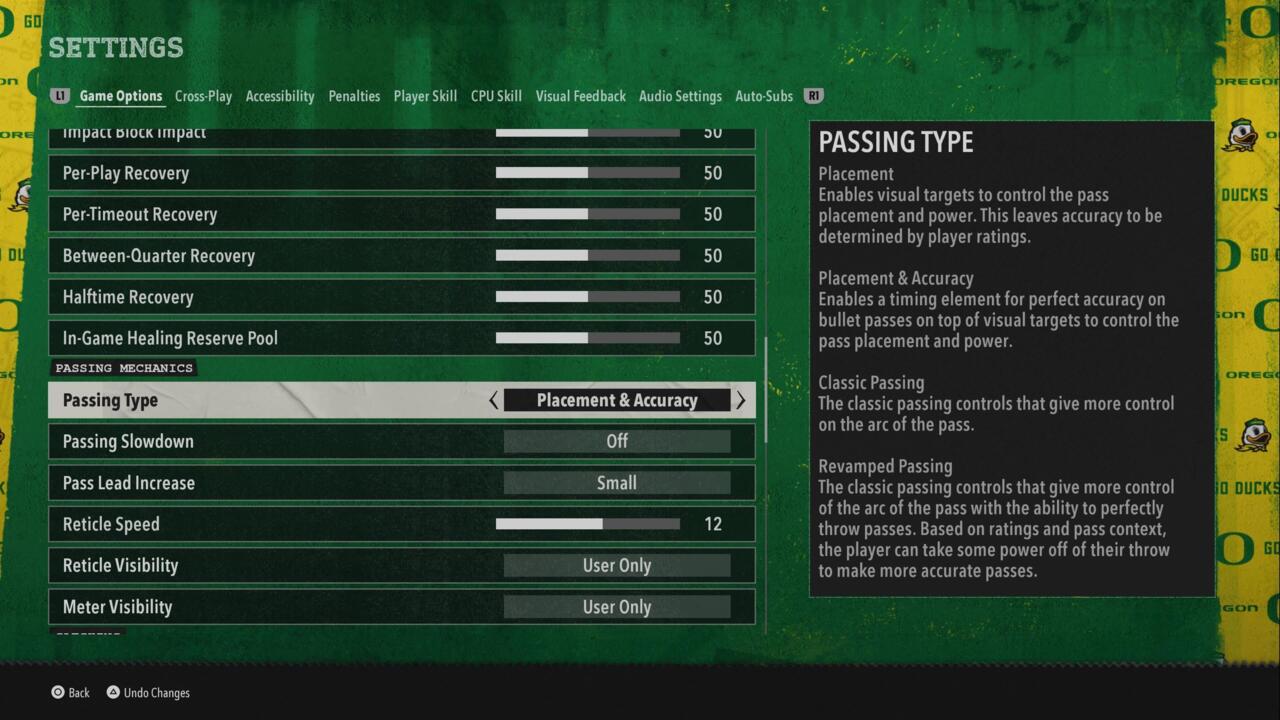
To start with, the Placement & Accuracy option is the top choice for Passing Type in CFB 26. The alternatives include: Placement, Classic Passing, and Revamped Passing. The default setting is Revamped Passing, which offers a modern twist on Classic Passing, giving you more control over the trajectory of passes. With a precise quarterback, you can place balls exactly where the receiver can catch them effectively.
Although sticking with the new Revamped Passing setting is an option, Placement & Accuracy provides superior precision for throwing. It introduces a timing element that allows for highly accurate bullet passes. You'll also have visual aids on screen to simplify controlling the ball's placement and power. Placement & Accuracy makes executing all types of passes in CFB 26 straightforward, provided you know how to use it efficiently. However, if you're looking for a fresh experience compared to CFB 25, you might prefer to stick with Revamped Passing and explore EA's new passing style.
Next, Passing Slowdown should always be off, as there's no practical need for a slowdown during a pass. Additionally, set Pass Lead Increase to "small." This setting narrows the window for leading receivers, which is preferable. Overleading receivers can result in the ball moving outside their catch radius, potentially causing an incomplete pass or an interception by a defender.
Lastly, the Reticle Speed setting is based on personal preference: we've found the 12-14 range to be ideal. However, if you prefer the reticle to move slower or faster, feel free to adjust it. The final two settings, Reticle Visibility and Meter Visibility, are less significant; leaving them set to User Only is perfectly fine.
That wraps up the Passing Mechanics settings in CFB 26. While they might seem minor, subtle adjustments can significantly influence your gameplay. Now that you've fine-tuned these settings, be sure to explore our guides on the best offensive playbooks and the best defensive playbooks in CFB 26.


Advertisement


Battlefield 6 Will Add Something Close To An Ultimate Ability For Each Class

Overwatch 2's Director Acknowledges That Game Needs More Story Content To Be "Firing On All Cylinders"

Tony Hawk's Pro Skater 3 + 4 Has A Whole Bunch Of Extra Levels That Are Easy To Miss

Sea Of Thieves Is Getting Its Own Subscription Service

IO Acknowledges Hitman Performance Issues On Switch 2, Promises Fixes Are Coming

Umamusume: Pretty Derby Creators Share Guidelines For Fans Who Want To Visit Real Race Horses

Bam Margera Is In Tony Hawk's Pro Skater 3 + 4 Because Of A Chance LA Visit

2025 Upcoming Games Release Schedule

Dress To Impress Codes July 2025 For Free Outfits And Accessories

Subnautica 2 Fans Call For A Boycott, Publisher Accuses Ex-Leadership Of Abandoning Responsibilities

Ghost Of Yotei Brings Back Kurosawa Mode, Adds New Modes From Samurai Film Directors

Best Passing Mechanics Settings To Pick In College Football 26